Instructions for Researchers
*Please refer to the Cohort Discovery Tool to identify the number of samples available that meet your criteria: http://med.stanford.edu/starr-tools/cohort-discovery.html
How to collect blood samples from your clinical patients using the Stanford Precision Health Biobank protocol:
- You need to send an email to precisionhealthbiobank@stanford.edu and state that you would like to use the established Stanford Precision Health Biobank protocol (IRB – 23066) for collection of blood samples from your clinic patients.
- Once the Stanford Precision Health Biobank’s coordinator receives your email, he/she will contact you to provide the current Informed consent and demographic sheet which will be completed by your clinic recruiter.
- The recruiter will enroll any patient who is willing to participate. Upon receiving consent from the patient, Precision health biobank recruiter will ask the patient’s doctor to put a lab order “G POOL RESTRICTED’’ in Epic. This is a biobanking lab order, and the patient does not get billed for this.
- Recruiter will make 2 copies of informed consent. One copy goes to the patient, and the other copy with a patient label and MRN will go to the HIMS department for Electronic Health Record Scanning. The original informed consent and Demographic sheet will be saved by the recruiter and collected by the coordinator of the Stanford Precision Health Biobank study on a regular basis from the recruiter.
- To utilize these samples, you must create a separate IRB protocol to access the Stanford Precision Health Biobank samples. Please see “How to Request Stanford Precision Health Biobank Samples".
How to request for Stanford Precision Health Biobank Samples:
- In your IRB application, please state that you would like to access samples stored in the Stanford Precision Health Biobank (e-protocol 23066). Samples were collected under an approved biobanking protocol (23066).
- Once approved, send Stanford Precision Health Biobank (precisionhealthbiobank@stanford.edu) the IRB protocol; this will be kept on file.
- We will then contact Research IT staff to conduct a data pull on eligible samples
- Once samples are identified, we will contact the lab to pull the Stanford Precision Health Biobank samples
- Samples must be picked up* from the lab, located at: 3375 Hillview Ave, Palo Alto, CA, United States
*Note: even if you are shipping off campus, samples must first be picked up from the lab.
Instructions for Researchers
Cohort Discovery Tool
In order to learn more about diagnoses in the Precision Health biobank, the Cohort Discovery Tool has been made available to affiliates of the Stanford School of Medicine. The link above can take you through the process for obtaining demograhics of certain diagnoses available in the Precision Health biobank. It is important to rememeber to add "PrecisionHealthBiobank" under the biobank tab.
Below are simple, step-by-step instructions on how to access the Cohort Discovery Tool:
1) Launch the webpage: http://med.stanford.edu/researchit/infrastructure/clinical-data-warehouse/cohort-tool.html
2) Double click on "biobank" and make sure PrecisionHealthBiobank is selected. Double click on "diagnosis" and either enter the name of the diagnosis or the ICD diagnosis code. This can also be done to determine number of patient procedures in the Precision Health biobank. If looking for procedural demographics, please make sure to use CPT codes.
3) Next, click "Analyze" and results will appear on screen.
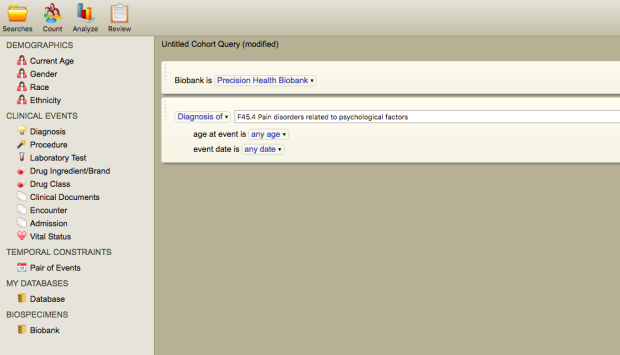
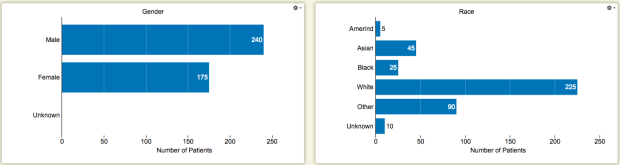
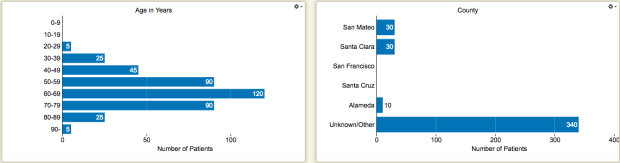
Figure 1. Patient demographics of diabetes mellitus (ICD code E08-E13).
Sample Availability